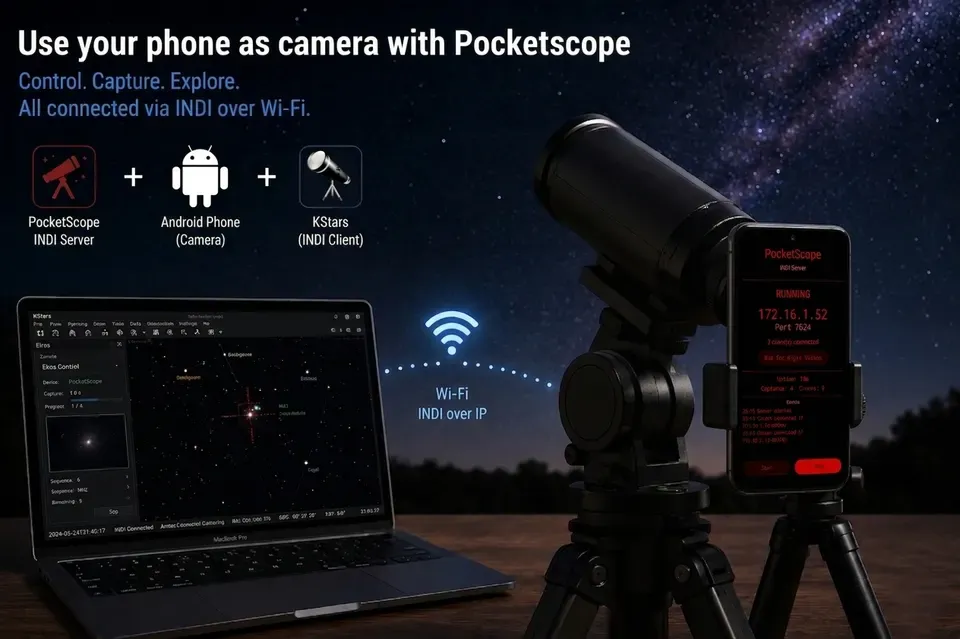
PocketScope is a revolutionary feature that transforms your Android smartphone into a fully-functional INDI-compatible astronomical camera and motorized focuser. By leveraging the advanced camera capabilities of modern Android devices, PocketScope allows you to use your phone as a standalone imaging rig, mounted to an eyepiece, or alongside your primary telescope setup.
Overview
PocketScope runs a native INDI server directly on the Android device, exposing its high-quality rear camera sensors as standard INDI CCD devices. It also provides an INDI Focuser interface for controlling the lens’s internal autofocus motors, enabling remote precision focusing.
Key Features
- Multi-Camera Support: Automatically detects and exposes multiple rear cameras (Ultrawide, Main, Telephoto) as individual INDI CCD devices.
- Raw Data Pipeline: Delivers 16-bit raw Bayer FITS output directly from the sensor. No on-device processing or debayering is performed, ensuring linear data ready for scientific calibration (darks, flats, and stacking).
- Manual Control: Full manual control over exposure times (from milliseconds up to 300+ seconds), ISO/Gain, and focus position.
- Accurate Metadata: FITS headers are automatically populated with critical astronomy metadata, including
BAYERPAT,XPIXSZ,YPIXSZ,EXPTIME, andGAIN. - Focuser Integration: Provides an INDI Focuser device for motorized lens focus control, allowing for automated focusing routines in clients like Ekos.
- Night-Vision Friendly: Features a dedicated red UI on the Android device to preserve your night vision during field use.
- Background Operation: Utilizes Android foreground services to maintain the INDI server and camera connection even when the screen is off or other apps are in use.
Technical Specifications
| Feature | Specification |
|---|---|
| Protocol | Standard INDI Protocol (Port 7624) |
| --- | --- |
| Output Format | 16-bit Raw Bayer FITS |
| --- | --- |
| Exposure Range | < 1ms to 300+ seconds (hardware dependent) |
| --- | --- |
| Android Version | Android 10+ |
| --- | --- |
| Hardware Req. | RAW_SENSOR support required |
| --- | --- |
| Verified Devices | Pixel 6 Pro and newer |
| --- | --- |
Getting Started
1. Installation
Install the PocketScope application on your compatible Android device. Ensure the device is connected to the same WiFi network as your INDI client (or use the device as a hotspot).
2. Launching the Server
Open PocketScope on your phone. The INDI server will start automatically on port 7624. The UI will turn red to protect your night vision.
3. Connecting from INDI Clients
In your preferred INDI client (Ekos, CCDciel, PHD2, etc.), create a new profile and add the PocketScope devices.
- Hostname: The IP address of your Android phone (shown on the App).
- Port: 7624
4. Device Selection
Depending on your phone’s hardware, you will see multiple devices:
PocketScope Main: The primary wide-angle camera.PocketScope Ultrawide: The ultrawide-angle camera.PocketScope Telephoto: The telephoto lens.PocketScope Focuser: The motorized focus control for the active lens.
Best Practices
- Power Management: Long exposure sessions can drain the battery. It is recommended to keep the phone connected to a power bank or external power source.
- Thermal Control: For long exposures, the sensor may heat up. If possible, avoid using thick phone cases that trap heat.
- Mounting: Use a high-quality smartphone adapter if mounting to an eyepiece. For standalone use, a dedicated tripod mount is essential.
- Server Chaining: You can use PocketScope alongside your existing INDI hardware by chaining servers. Add your phone’s IP to your main INDI server configuration to see all devices in one place.
PocketScope is developed by TacoTakumi and is released under the GPL v3 license. Source code: github.com/TacoTakumi/PocketScope
WeAreAllOne :)
Found a mistake? This page is a Markdown file.Edit this page on GitHub